> For the complete documentation index, see [llms.txt](https://docs.kpnthings.com/kpn-things/llms.txt). Markdown versions of documentation pages are available by appending `.md` to page URLs; this page is available as [Markdown](https://docs.kpnthings.com/kpn-things/building-blocks/data-processing/decoders-and-encoders/diy-decoder/diy-decoder-scripts.md).
# DIY decoder scripts
DIY decoder scripts are responsible for converting the data sent by your device into the [SenML](/kpn-things/building-blocks/data-processing/thingsml-and-senml/senml.md) format required by KPN Things. The data sent by your device is enriched with some metadata and provided to your script as a stringified JSON structure.
## Script setup
The JavaScript decoder must consist of a main function that accepts a single string parameter and returns a single string or `null`. The string should be a SenML pack as JSON. Returning `null` signifies that the messages should not be processed further.
The input parameter string contains the input data in JSON format. See [inputString typedef](#javascript-typedef-file) for the structure of the JSON found in the input data.
## Script Tester
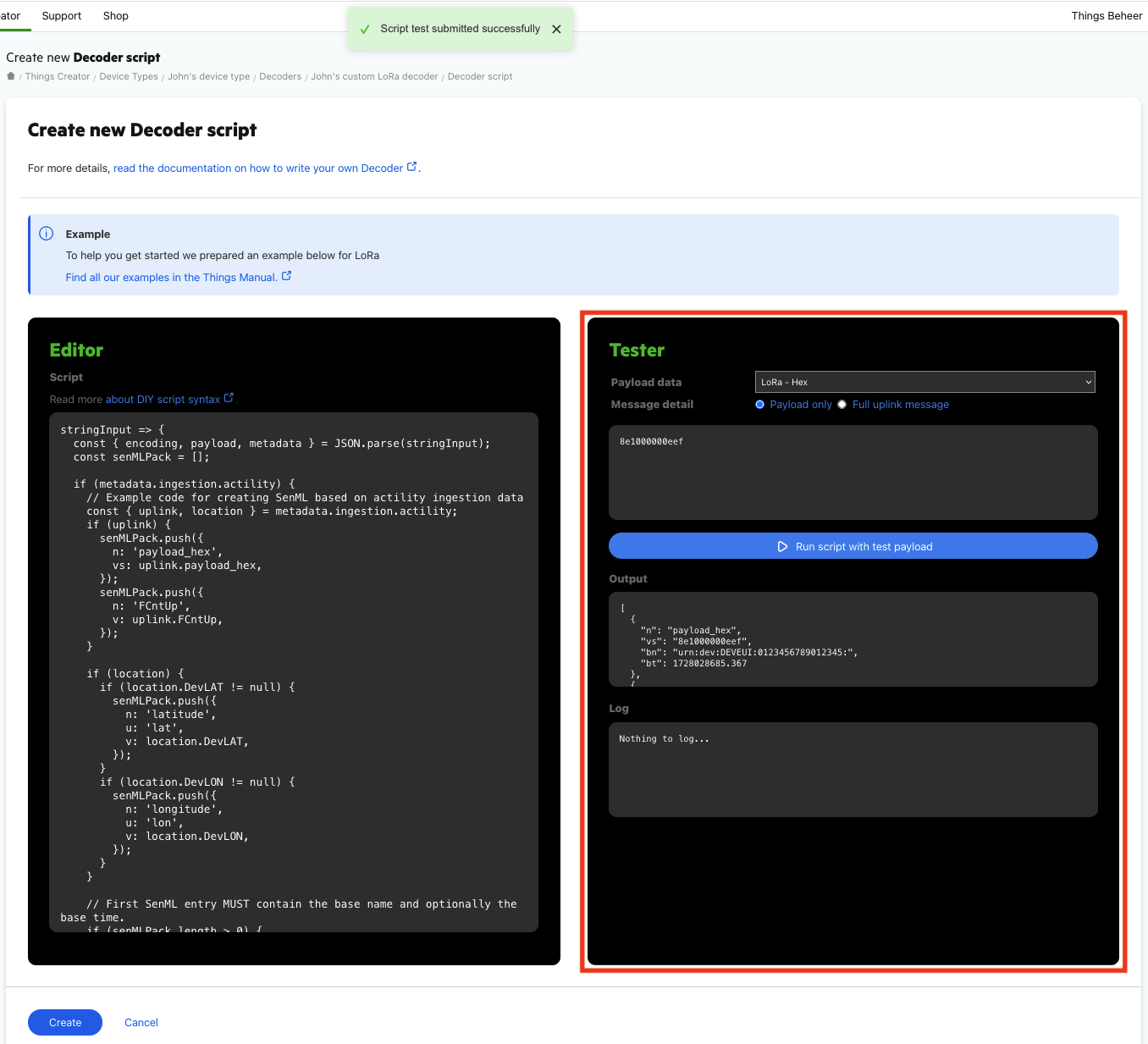
The image below shows the script tester (indicated with a red square) next to the script editor.
The script tester can be used to test the script with the provided message data from the tester window and should be used to verify that the script is correct and returns valid SenML. This is done in an isolated environment. The result of the test execution is shown in the Output window and script logs are displayed in the Log window. Errors that may occur, will be displayed in both [Output and Log windows](#errors).
*It is safe to trial-and-error within the tester as it does not touch or involve anything outside of the isolated test environment*.
The script tester provides a few options:
* **Payload data** - the type of payload data that the device type supports. The drop-down list will contain every supported payload data to choose from.
* **Message detail** - whether only the payload or the entire uplink message should be displayed in the text field below. The message data is editable.
* **Test button** - executes the test with the script that is currently present in the editor and the message data. The tester always uses the full uplink message data, no matter which message detail is selected.
* **Output window** - presents the result of the test execution.
* **Log window** - custom script logs or various [error messages](#errors) will appear in this window.
#### Errors
Output window:
**Script errors** - when an error is thrown in the script itself. A warning toast will also pop-up at the top center of the page stating that the script did not execute successfully.
**JavaScript errors (ReferenceError, SyntaxError, TypeError…)** - when a JavaScript error occurs. The accompanying error message is also presented to clarify what went wrong.
Log window:
**Output is not valid SenML** - when the output contains invalid SenML records. Output will still be displayed in the output window.
**SenML processing errors** - when a SenML specific error occurs
## Script examples
Example scripts can be found in this section for each protocol supported by the DIY decoders.
* [A LoRa message decoding script](#for-a-lora-message)
* [An MQTT message decoding script](#for-an-mqtt-message)
* [A SenML over HTTP(S) message decoder script](https://docs.kpnthings.com/kpn-things/building-blocks/data-processing/decoders-and-encoders/diy-decoder/diy-decoder-scripts#for-a-senml-over-http-s-message)
* [A universal message decoding script](https://docs.kpnthings.com/kpn-things/building-blocks/data-processing/decoders-and-encoders/diy-decoder/diy-decoder-scripts#example-decoder-that-supports-multiple-protocol-messages)
### For a LoRa message
The below example script for LoRa messages presents decoding of payloads that might contain uplink or location data, or both.
```javascript
stringInput => {
const { encoding, payload, metadata } = JSON.parse(stringInput);
const senMLPack = [];
if (metadata.ingestion.actility) {
// Example code for creating SenML based on actility ingestion data
const { uplink, location } = metadata.ingestion.actility;
if (uplink) {
senMLPack.push({
n: 'payload_hex',
vs: uplink.payload_hex,
});
senMLPack.push({
n: 'FCntUp',
v: uplink.FCntUp,
});
}
if (location) {
if (location.DevLAT != null) {
senMLPack.push({
n: 'latitude',
u: 'lat',
v: location.DevLAT,
});
}
if (location.DevLON != null) {
senMLPack.push({
n: 'longitude',
u: 'lon',
v: location.DevLON,
});
}
}
// First SenML entry MUST contain the base name and optionally the base time.
if (senMLPack.length > 0) {
// bn SHOULD be filled with the network URN
// The URN can be constructed using the DevEUI from the Actility data
const devEui = (uplink ?? location).DevEUI;
senMLPack[0].bn = `urn:dev:DEVEUI:${devEui}:`;
// bt is in epoch seconds, but can contain fraction
senMLPack[0].bt = Date.parse(metadata.ingestion.timestamp) / 1000.0;
}
} else {
// unexpected / unsupported ingested message type, return null to stop further processing
return null;
}
return JSON.stringify(senMLPack);
}
```
### For an MQTT message
The below example script for MQTT messages presents decoding of both text and binary payloads of an MQTT message.
stringInput => {
  // Helper functions for base64 decoding
  const b64re = /^(?:[A-Za-z\d+\/]{4})*?(?:[A-Za-z\d+\/]{2}(?:==)?|[A-Za-z\d+\/]{3}=?)?$/;
  const b64ch = "ABCDEFGHIJKLMNOPQRSTUVWXYZabcdefghijklmnopqrstuvwxyz0123456789+/";
  const fromCc = String.fromCharCode;

  const Base64 = {
    toUtf8: (bin) => {
      bin = bin.replace(/\s+/g, '');
      if (!b64re.test(bin)) throw new TypeError('Malformed base64.');
      var e = {}, i, b = 0, c, x, l = 0, a, r = '', len = bin.length;
      for (i = 0; i < 64; i++) { e[b64ch.charAt(i)] = i; }
      for (x = 0; x < len; x++) {
        c = e[bin.charAt(x)];
        b = (b<<6) + c;
        l += 6;
        while (l >= 8) {
         ((a = (b >>> (l -= 8)) & 0xff) || (x < (len - 2))) && (r += fromCc(a));
        }
      }
      return r;
    },
    toUint8Array: (bin) => Uint8Array.from(Base64.toUtf8(bin), c => c.charCodeAt(0))
  };

  const { encoding, payload, metadata } = JSON.parse(stringInput);

  const senMLPack = [];

  // Example code for creating SenML based on ingested MQTT message
  if (encoding?.endsWith('base64')) {
    // The payload is base64 encoded. Here, you'd parse the binary payload, process
    // its contents and build up the senML pack contents.
    let decoded = Base64.toUtf8(payload); // decoded string
    senMLPack.push({ n: 'decodedPayload', vs: decoded });
  } else {
    senMLPack.push({ n: 'payload', vs: payload });
  }

  const contentType = metadata.ingestion.mqtt.contentType;
  if (contentType) {
    senMLPack.push({ n: 'contentType', vs: contentType });
  }

  // First SenML entry MUST contain the base name and optionally the base time.
  if (senMLPack.length > 0) {
    // bn SHOULD be filled with the network URN
    senMLPack[0].bn = metadata.ingestion.mqtt.networkUrn;
    // bt is in epoch seconds, but can contain fraction
    senMLPack[0].bt = Date.parse(metadata.ingestion.timestamp) / 1000.0;
  } else {
    // unexpected / unsupported ingested message type, return null to stop further processing
    return null;
  }
  return JSON.stringify(senMLPack);
}
### For a SenML over HTTP(S) message
The example below decodes a SenML message sent over the HTTP(S) protocol.
```javascript
stringInput => {
// Helper functions for http-senml decoding
var isNullish = (value) => value === null || value === void 0;
var SenMLPack = class _SenMLPack {
constructor(data) {
if (!Array.isArray(data)) {
throw Error("Not a SenML pack: " + data);
}
this.records = [];
let baseRecord = null;
for (const record of data) {
if (typeof record === "object" && !Object.keys(record).find((key) => key !== "bn" && key !== "bt" && key !== "bu" && key !== "bs" && key !== "bver")) {
baseRecord = baseRecord ? { ...baseRecord, ...record } : record;
} else {
if (baseRecord) {
this.records.push({ ...baseRecord, ...record });
baseRecord = null;
} else {
this.records.push(record);
}
}
}
if (baseRecord) {
this.records.push(baseRecord);
}
}
/**
* @param {number} now the timestamp that should be used as 'now' when resolving times.
* @returns {SenMLPack} a new SenMLPack instance where the times are resolved.
*/
resolveTimes(now) {
const resolve = (time = 0) => isRelative(time) ? now + time : time;
const minAbsoluteTime = Math.pow(2, 28);
const isRelative = (time) => time < minAbsoluteTime;
let bt = 0;
let origBt = 0;
const result = [];
for (const [index, record] of this.records.entries()) {
const mapped = { ...record };
if (!isNullish(record.bt)) {
origBt = record.bt;
mapped.bt = bt = resolve(record.bt);
} else if (index === 0 && isRelative(record.t || 0)) {
mapped.bt = bt = now;
}
if (!isNullish(record.t) && isRelative(origBt) && !isRelative(record.t)) {
mapped.t = record.t + origBt - bt;
}
result.push(mapped);
}
return new _SenMLPack(result);
}
/**
* @returns {string}
*/
toJson() {
return JSON.stringify(this.records);
}
};
const { encoding, payload, metadata } = JSON.parse(stringInput);
const senMLPack = [];
if (metadata.ingestion['http-senml']) {
// Example code for creating resolved SenML based on an ingested http-senml message
const pack = new SenMLPack(payload);
const ingestionTime = metadata?.ingestion?.timestamp;
if (ingestionTime) {
return pack.resolveTimes(Date.parse(ingestionTime) / 1e3).toJson();
}
return pack.toJson();
} else {
// unexpected / unsupported ingested message type, return null to stop further processing
return null;
}
return JSON.stringify(senMLPack);
}
```
### Example decoder that supports multiple protocol messages
The example below presents a decoder supporting multiple protocol messages. It first determines which one of the protocols is being utilized and then decodes the message appropriately.
stringInput => {
  // Helper functions for base64 decoding
  const b64re = /^(?:[A-Za-z\d+\/]{4})*?(?:[A-Za-z\d+\/]{2}(?:==)?|[A-Za-z\d+\/]{3}=?)?$/;
  const b64ch = "ABCDEFGHIJKLMNOPQRSTUVWXYZabcdefghijklmnopqrstuvwxyz0123456789+/";
  const fromCc = String.fromCharCode;

  const Base64 = {
    toUtf8: (bin) => {
      bin = bin.replace(/\s+/g, '');
      if (!b64re.test(bin)) throw new TypeError('Malformed base64.');
      var e = {}, i, b = 0, c, x, l = 0, a, r = '', len = bin.length;
      for (i = 0; i < 64; i++) { e[b64ch.charAt(i)] = i; }
      for (x = 0; x < len; x++) {
        c = e[bin.charAt(x)];
        b = (b<<6) + c;
        l += 6;
        while (l >= 8) {
         ((a = (b >>> (l -= 8)) & 0xff) || (x < (len - 2))) && (r += fromCc(a));
        }
      }
      return r;
    },
    toUint8Array: (bin) => Uint8Array.from(Base64.toUtf8(bin), c => c.charCodeAt(0))
  };

  // Helper functions for http-senml decoding
  var isNullish = (value) => value === null || value === void 0;
  var SenMLPack = class _SenMLPack {
    constructor(data) {
      if (!Array.isArray(data)) {
        throw Error("Not a SenML pack: " + data);
      }
      this.records = [];
      let baseRecord = null;
      for (const record of data) {
        if (typeof record === "object" && !Object.keys(record).find((key) => key !== "bn" && key !== "bt" && key !== "bu" && key !== "bs" && key !== "bver")) {
          baseRecord = baseRecord ? { ...baseRecord, ...record } : record;
        } else {
          if (baseRecord) {
            this.records.push({ ...baseRecord, ...record });
            baseRecord = null;
          } else {
            this.records.push(record);
          }
        }
      }
      if (baseRecord) {
        this.records.push(baseRecord);
      }
    }

    /**
     * @param {number} now the timestamp that should be used as 'now' when resolving times.
     * @returns {SenMLPack} a new SenMLPack instance where the times are resolved.
     */
    resolveTimes(now) {
      const resolve = (time = 0) => isRelative(time) ? now + time : time;
      const minAbsoluteTime = Math.pow(2, 28);
      const isRelative = (time) => time < minAbsoluteTime;
      let bt = 0;
      let origBt = 0;
      const result = [];
      for (const [index, record] of this.records.entries()) {
        const mapped = { ...record };
        if (!isNullish(record.bt)) {
          origBt = record.bt;
          mapped.bt = bt = resolve(record.bt);
        } else if (index === 0 && isRelative(record.t || 0)) {
          mapped.bt = bt = now;
        }
        if (!isNullish(record.t) && isRelative(origBt) && !isRelative(record.t)) {
          mapped.t = record.t + origBt - bt;
        }
        result.push(mapped);
      }
      return new _SenMLPack(result);
    }

    /**
     * @returns {string}
     */
    toJson() {
      return JSON.stringify(this.records);
    }
  };

  const { encoding, payload, metadata } = JSON.parse(stringInput);
  const senMLPack = [];

  if (metadata.ingestion.actility) {
    // Example code for creating SenML based on actility ingestion data
    const { uplink, location } = metadata.ingestion.actility;
    if (uplink) {
      senMLPack.push({
        n: 'payload_hex',
        vs: uplink.payload_hex,
      });
      senMLPack.push({
        n: 'FCntUp',
        v: uplink.FCntUp,
      });
    }

    if (location) {
      if (location.DevLAT != null) {
        senMLPack.push({
          n: 'latitude',
          u: 'lat',
          v: location.DevLAT,
        });
      }
      if (location.DevLON != null) {
        senMLPack.push({
          n: 'longitude',
          u: 'lon',
          v: location.DevLON,
        });
      }
    }

    // First SenML entry MUST contain the base name and optionally the base time.
    if (senMLPack.length > 0) {
      // bn SHOULD be filled with the network URN
      // The URN can be constructed using the DevEUI from the Actility data
      const devEui = (uplink ?? location).DevEUI;
      senMLPack[0].bn = `urn:dev:DEVEUI:${devEui}:`;
      // bt is in epoch seconds, but can contain fraction
      senMLPack[0].bt = Date.parse(metadata.ingestion.timestamp) / 1000.0;
    }
  } else if (metadata.ingestion.mqtt) {
    // Example code for creating SenML based on ingested MQTT message
    if (encoding?.endsWith('base64')) {
      // The payload is base64 encoded. Here, you'd parse the binary payload, process its contents
      // and build up the senML pack contents.
      let decoded = Base64.toUtf8(payload); // decoded string
      senMLPack.push({ n: 'decodedPayload', vs: decoded });
    } else {
      senMLPack.push({ n: 'payload', vs: payload });
    }

    const contentType = metadata.ingestion.mqtt.contentType;
    if (contentType) {
      senMLPack.push({ n: 'contentType', vs: contentType });
    }

    // First SenML entry MUST contain the base name and optionally the base time.
    if (senMLPack.length > 0) {
      // bn SHOULD be filled with the network URN
      senMLPack[0].bn = metadata.ingestion.mqtt.networkUrn;
      // bt is in epoch seconds, but can contain fraction
      senMLPack[0].bt = Date.parse(metadata.ingestion.timestamp) / 1000.0;
    }
  } else if (metadata.ingestion['http-senml']) {
    // Example code for creating resolved SenML based on an ingested http-senml message
    const pack = new SenMLPack(payload);
    const ingestionTime = metadata?.ingestion?.timestamp;
    if (ingestionTime) {
      return pack.resolveTimes(Date.parse(ingestionTime) / 1e3).toJson();
    }

    return pack.toJson();
  } else {
    // unexpected / unsupported ingested message type, return null to stop further processing
    return null;
  }

  return JSON.stringify(senMLPack);
}
## JavaScript typedef file
The snippet below describes the structure of the `ScriptInput` parameter provided to the DIY Decoder function.
```jsdoc
/**
* This is a definition of the types that come with the input
*
* @typedef {object} ScriptInput
* @property {Metadata} metadata
* @property {string} encoding
* @property {object} payload - type is the same as the input encoding
*
* Metadata
* @typedef {object} Metadata
* @property {Device} device
* @property {Ingestion} ingestion
*
* Device
* @typedef {object} Device
* @property {string} name
* @property {string} [barcode]
*
* Ingestion
* @typedef {object} Ingestion
* @property {string} timestamp - ISO 8601 timestamp string
* @property {ActilityIngestionMetadata} [actility] - Lora / Actility specific data
* @property {MQTTIngestionMetadata} [mqtt] - MQTT specific data
* @property {HttpSenMLIngestionMetadata} [http-senml] - SenML over HTTP(S) Specific data
*
* ActilityIngestionMetadata
* @typedef {object} ActilityIngestionMetadata
* @property {LocalGateway[]} gateways - matching Local Gateways or empty if none are provided
* @property {ActilityLocation} [location] - associated Actility location if available or a falsy value if not.
* @property {ActilityUplink} [uplink] - associated Actility uplink if available or a falsy value if not.
*
* LocalGateway
* @typedef {object} LocalGateway
* @property {string} lrrId - ID of the gateway (LRR)
* @property {string} locationDescription - free-form location description assigned to the gateway
*
* See https://oss-api.thingpark.com/tpe/7.1/Core-Network/lrc-as-tunnel-lorawan/documentation-tunnel-lrc-to-as-lorawan.html
* @typedef {object} ActilityLocation
* @property {string} CustomerID - Customer ID associated with the Device Manager account.
* @property {string} DevAddr - Device DevAddr (Pattern: ^[0-9A-F]{8}$).
* @property {string} DevEUI - Device DevEUI in lower case hexadecimal ASCII format (Pattern: ^[0-9a-f]{16}$).
* @property {string} DevLocTime - Last geolocation timestamp (date-time).
* @property {number} DevLAT - Last geolocation latitude (GPS coordinate system).
* @property {number} DevLON - Last geolocation longitude (GPS coordinate system).
* @property {number} DevAlt - Last geolocation altitude (meter).
* @property {number} DevLocRadius - Last geolocation horizontal tolerance (meter).
* @property {number} DevAltRadius - Last geolocation vertical tolerance (meter).
* @property {number} DevNorthVel - Velocity (NORTH axis) expressed in m/s.
* @property {number} DevEastVel - Velocity (EAST axis) expressed in m/s.
* @property {number} DevLocDilution - Horizontal DOP (dilution of precision) calculated for given mutual position of gateways, used for solution calculation, and device.
* @property {number} DevAltDilution - Vertical DOP (dilution of precision) calculated for given mutual position of gateways, used for solution calculation, and device.
* @property {number} DevUlFCntUpUsed - The uplink counter used for this location resolution (Interval: [0, 4294967295]).
* @property {string} Lrcid - ID of the LRC sending the report (Pattern: ^[0-9A-F]{8}$).
* @property {string} ModelCfg - ThingPark X configuration set by provisioning.
* @property {number} NwGeolocAlgo - Network geolocation algorithm configured for the device (Interval: [0, 2]):
* - 0: Time Difference Of Arrival (TDOA)
* - 1: Received Signal Strength Indicator (RSSI)
* - 2: Both (TDOA and RSSI)
* @property {number} NwGeolocAlgoUsed - Network geolocation algorithm used by the geolocation solver (Interval: [0, 1]):
* - 0: Time Difference Of Arrival (TDOA)
* - 1: Received Signal Strength Indicator (RSSI)
* @property {string} Time - LRC Timestamp for the geolocation.
* @property {CustomerData} CustomerData - Customer data set by provisioning.
*
* See https://oss-api.thingpark.com/tpe/7.1/Core-Network/lrc-as-tunnel-lorawan/documentation-tunnel-lrc-to-as-lorawan.html
* @typedef {object} ActilityUplink
* @property {number} ACKbit - ACKBit set by the device. ACKbit is not filled in the document if not set in the uplink frame.
* @property {number} ADRbit - ADRBit set by the device. ADRbit is not filled in the document if not set in the uplink frame.
* @property {number} AFCntDn - The applicative downlink counter to be used for the next downlink frame. See FCntDn field for reporting rules. Only applicable to LoRaWAN® 1.1 when the FPort > 0.
* @property {string} AppSKey - Encrypted AppSkey with the AS transport key. AppSKey is not filled in the document if end-to-end encryption is not used.
* @property {string} AppSKeyEKLabel - Label of the AS transport key used to encrypt the AppSKey.
* @property {number} BatteryLevel - Battery level reported by the ReportDevStatus. BatteryLevel is only filled if the Connectivity Plan ReportDevStatusBattery feature flag is activated. When activated, the battery level is only reported periodically, according to the Connectivity Plan DevStatusReqFreq setting.
* @property {string} BatteryTime - Battery level reporting timestamp (ISO 8601). BatteryTime is only filled if the Connectivity Plan ReportDevStatusBattery feature flag is activated. When activated, the battery level is only reported periodically, according to the Connectivity Plan DevStatusReqFreq setting.
* @property {string} Channel - LC ID of the radio channel used to transmit the frame. This field is not relevant when Lrrid is set to 00000000.
* @property {number} ClassBPeriodicity - Class B periodicity in seconds requested by the device. Only applicable to Class B.
* @property {number} ConfAFCntDn - The applicative downlink counter CONFIRMED by the device for this packet. Only applicable to LoRaWAN® 1.1 when the uplink frame acknowledges a previous downlink frame.
* @property {string} CustomerID - Customer ID associated with the Device Manager account.
* @property {string} DevAddr - Device DevAddr.
* @property {string} DevEUI - Device DevEUI in upper case hexadecimal ASCII format.
* @property {number} DevLrrCnt - Number of LRRs which received this packet.
* @property {string} DevLocTime - Last geolocation timestamp. Only filled if the Connectivity Plan NwGeolocation feature flag is activated and a geolocation has been resolved based on previous uplink frames.
* @property {number} DevLAT - Last geolocation latitude (GPS coordinate system). Only filled if the Connectivity Plan NwGeolocation feature flag is activated and a geolocation has been resolved based on previous uplink frames.
* @property {number} DevLON - Last geolocation longitude (GPS coordinate system). Only filled if the Connectivity Plan NwGeolocation feature flag is activated and a geolocation has been resolved based on previous uplink frames.
* @property {number} DevAlt - Last geolocation altitude (meter). Only filled if the Connectivity Plan NwGeolocation feature flag is activated, a geolocation has been resolved based on previous uplink frames, and this information is available in the geolocation resolution output.
* @property {number} DevLocRadius - Last geolocation horizontal tolerance (meter). Only filled if the Connectivity Plan NwGeolocation feature flag is activated, a geolocation has been resolved based on previous uplink frames, and this information is available in the geolocation resolution output.
* @property {number} DevAltRadius - Last geolocation vertical tolerance (meter). Only filled if the Connectivity Plan NwGeolocation feature flag is activated, a geolocation has been resolved based on previous uplink frames, and this information is available in the geolocation resolution output.
* @property {number} DevNorthVel - Velocity (NORTH axis) expressed in m/s. Only filled if the Connectivity Plan NwGeolocation feature flag is activated, a geolocation has been resolved based on previous uplink frames, and this information is available in the geolocation resolution output.
* @property {number} DevEastVel - Velocity (EAST axis) expressed in m/s. Only filled if the Connectivity Plan NwGeolocation feature flag is activated, a geolocation has been resolved based on previous uplink frames, and this information is available in the geolocation resolution output.
* @property {number} DevLocDilution - Horizontal DOP (dilution of precision) calculated for the given mutual position of gateways, used for solution calculation, and device. Only filled if the Connectivity Plan NwGeolocation feature flag is activated, a geolocation has been resolved based on previous uplink frames, and this information is available in the geolocation resolution output.
* @property {number} DevAltDilution - Vertical DOP (dilution of precision) calculated for the given mutual position of gateways, used for solution calculation, and device. Only filled if the Connectivity Plan NwGeolocation feature flag is activated, a geolocation has been resolved based on previous uplink frames, and this information is available in the geolocation resolution output.
* @property {number} DevUlFCntUpUsed - The FCntUp used for this location resolution. Only filled if the Connectivity Plan NwGeolocation feature flag is activated, a geolocation has been resolved based on previous uplink frames, and this information is available in the geolocation resolution output.
* @property {string} DynamicClass - LoRaWAN® class currently used by the Device: 'A', 'B' or 'C'.
* @property {number} FCntDn - The downlink counter to be used for the next downlink frame. Only applicable to LoRaWAN® 1.0.
* @property {number} FCntUp - The uplink counter for this packet.
* @property {string} ForwardingNetID - The NetID of the forwarding NS, when a third-party roaming fNS was used to route the packet.
* @property {string} ForwardingNSID - The NSID of the forwarding NS, when a third-party roaming fNS was used to route the packet using LoRaWAN® BE 1.1.
* @property {number} FPort - LoRaWAN® FPort used by the device for this packet. Only set if present in the uplink packet.
* @property {number} Frequency - Frequency in MHz of the radio channel used to transmit the frame. This field is not relevant when Lrrid is set to 00000000.
* @property {number} InstantPER - Instantaneous PER (Packet Error Rate). InstantPER is only filled if the Connectivity Plan AddPERInfo feature flag is activated. The instantaneous PER is computed over the 2 last distinct uplink frames.
* @property {number} Late - Indicates if the packet was queued by the LRR. Late is always filled. 0 means that the packet was not queued by the LRR, 1 means that the packet was queued.
* @property {string} Lrcid - ID of the LRC sending the report
* @property {number} LrrESP - ESP measured by the best LRR
* @property {string} Lrrid - The ID of the LRR that received the packet with the best SNR. This LRR is flagged as "best LRR".
* @property {number} LrrLAT - Latitude of the best LRR. LrrLAT is only filled if the Connectivity Plan AddLrrMetaInfo feature flag is activated.
* @property {number} LrrLON - Longitude of the best LRR. LrrLON is only filled if the Connectivity Plan AddLrrMetaInfo feature flag is activated.
* @property {number} LrrRSSI - RSSI measured by the best LRR
* @property {number} LrrSNR - SNR measured by the best LRR
* @property {{Lrr: Lrr[]}} Lrrs - The list of LRRs which reported the packet before the expiration of the 250 ms deduplication window. If the packet was reported by more than 10 LRRs before the expiration of the 250 ms deduplication window, only the 10 LRRs with the best SNR are reported. Only filled if the Connectivity Plan AddLrrMetaInfo feature flag is activated.
* @property {number} Margin - Margin reported by the ReportDevStatus. Margin is only filled if the Connectivity Plan ReportDevStatusMargin feature flag is activated. When activated, the margin is only reported periodically, according to the Connectivity Plan DevStatusReqFreq setting.
* @property {number} MeanPER - Mean PER (Packet Error Rate). MeanPER is only filled if the Connectivity Plan AddPERInfo feature flag is activated.
* @property {string} mic_hex - MIC in hexadecimal ASCII format
* @property {string} ModelCfg - ThingPark X configuration set by provisioning
* @property {number} MType - LoRaWAN® MType of the packet
* @property {number} NbTrans - The number of transmissions for each uplink message requested by the LRC, according to ADR algorithm and validated by the device through a LinkADRAns MAC command. If no LinkADRAns have been yet validated by the device, NbTrans = 1.
* @property {number} NwGeolocAlgo - Network geolocation algorithm configured for the device
* @property {number} NwGeolocAlgoUsed - Network geolocation algorithm used by the geolocation solver
* @property {string} payload_hex - LoRaWAN® payload in hexadecimal ASCII format. The payload is not reported if it is smaller than or equal to the DummyPayloadMaxSize value configured in the Device Profile.
* @property {number} Roaming - Indicates the type of roaming, when a third-party roaming fNS was used to route the packet.
* @property {number} SpFact - SF used by the device
* @property {string} SubBand - Sub-band of the radio channel used to transmit the frame. This field is not relevant when Lrrid is set to 00000000.
* @property {string} Time - LRR Timestamp for the packet
* @property {number} TxPower - The transmission power of the device (in dBm), computed by the LRC based on ADR algorithm and validated by the device through a LinkADRAns. If no LinkADRAns have been yet validated by the device, the device boot parameter is used instead.
* @property {number} deviceUplinkDC - The aggregate occupancy rate of the RF logical channel associated with this uplink frame, as estimated at the time of reception. deviceUplinkDC is only filled if the Connectivity Plan AddUplinkDCInfo feature flag is activated.
* @property {number} deviceUplinkDCSubBand - The aggregate occupancy rate of the RF sub-band associated with this uplink frame, as estimated at the time of reception. deviceUplinkDCSubBand is only filled if the Connectivity Plan AddUplinkDCInfo feature flag is activated.
* @property {BaseStationData} BaseStationData - Base Station properties set by provisioning. Only reported for the best LRR when it belongs to the device's owner.
* @property {CustomerData} CustomerData - Customer data set by provisioning
* @property {DriverCfg} DriverCfg - Metadata for Driver selection
* @typedef {object} Lrr
* @property {number} Interval - The interval within the range [1, 10].
* @property {number} Chain - The LRR antenna chain used to receive the packet (integer within the range of int32).
* @property {string} Lrrid - LRR ID associated to this field (Pattern: ^[0-9A-F]{8}$).
* @property {number} LrrESP - ESP measured by the LRR associated with this field element (Multiple of: 0.000001).
* @property {number} LrrRSSI - RSSI measured by the LRR associated with this field (Multiple of: 0.000001).
* @property {number} LrrSNR - SNR measured by the LRR associated with this field (Multiple of: 0.000001).
* @property {string} ForwardingNetID - The NetID of the forwarding NS when a third-party roaming fNS was used to route the packet (Pattern: ^[0-9A-F]{6}$).
* @property {string} ForwardingNSID - The NSID of the forwarding NS when a third-party roaming fNS was used to route the packet using LoRaWAN® BE 1.1 (Pattern: ^[0-9A-F]{16}$).
* @typedef {object} BaseStationData
* @property {Array} doms - An array of domain information.
* @property {string} doms.n - Domain name (string).
* @property {string} doms.g - Domain group name (string).
* @property {string} name - Base station name (string).
* @typedef {object} CustomerData
* @property {object} loc - Administrative device location.
* @property {string} loc.lat - Device latitude (string).
* @property {string} loc.lon - Device longitude (string).
* @property {object} alr - Device application layer.
* @property {string} alr.pro - Product (string).
* @property {string} alr.ver - Version (string).
* @property {Array} tags - An array of tags associated with the device (string).
* @property {Array} doms - An array of domain information.
* @property {string} doms.n - Domain name (string).
* @property {string} doms.g - Domain group name (string).
* @property {string} name - Device name (string).
* @typedef {object} DriverCfg
* Metadata for Driver selection.
* @property {object} mod - Device model metadata.
* @property {string} mod.pId - Producer identifier (string).
* @property {string} mod.mId - Module identifier (string).
* @property {string} mod.ver - Version (string).
* @property {object} app - Device protocol metadata.
* @property {string} app.pId - Producer identifier (string).
* @property {string} app.mId - Module identifier (string).
* @property {string} app.ver - Version (string).
*
* MQTTIngestionMetadata
* @typedef {object} MQTTIngestionMetadata
* @property {MQTTData} Mqtt - MQTT specific data
* @property {string} Timestamp - ISO 8601 date and time
*
* MQTT specific data
* @typedef {object} MQTTData
* @property {string} ContentType - MIME type of the message.
* @property {string} NetworkUrn - Unique identifier for the network to which the device is connected.
* @proeprty {string} Topic - MQTT topic to which the messages are published.
* @property {string} Username - Username used for authentication when connecting to the MQTT broker.
*
* HttpSenMLIngestionMetadata
* @typedef {object} HttpSenMLIngestionMetadata
* @property {object} Headers - HTTP request headers
* @property {string} Method - HTTP request method
* @property {string} NetworkUrn - Unique identifier for the network to which the device is connected.
* @property {string} Timestamp - ISO 8601 date and time
*/
```
See also:
*
---
# Agent Instructions
This documentation is published with GitBook. GitBook is the documentation platform designed so that both humans and AI agents can read, navigate, and reason over technical content effectively. Learn more at gitbook.com.
## Querying This Documentation
If you need additional information that is not directly available in this page, you can query the documentation dynamically by asking a question.
Perform an HTTP GET request on the current page URL with the `ask` query parameter, and the optional `goal` query parameter:
```
GET https://docs.kpnthings.com/kpn-things/building-blocks/data-processing/decoders-and-encoders/diy-decoder/diy-decoder-scripts.md?ask=&goal=
```
`ask` is the immediate question: it should be specific, self-contained, and written in natural language.
`goal` is optional and describes the broader end goal you are ultimately trying to accomplish on behalf of the user. GitBook uses it to tailor the answer towards what is most useful for that goal.
The response will contain a direct answer to the question and relevant excerpts and sources from the documentation.
Use this mechanism when the answer is not explicitly present in the current page, you need clarification or additional context, or you want to retrieve related documentation sections.